
Wireless Settings for When the Camera Is Off (Power-off Standby)
You can choose whether the camera will maintain a wireless connection to the smartphone when off.
Menu
- MENU U e U 4. Wi-Fi/Bluetooth U Q Settings U Power-off Standby
| Select | When you turn the camera off, you will be prompted to choose whether to maintain the wireless connection to the smartphone. |
|---|---|
| Off | Turning the camera off terminates the wireless connection to the smartphone. |
| On | When the camera is turned off, the connection to the smartphone remains active and the smartphone can still be used to download or view the pictures on the camera. |
“Select”
When [Select] is chosen for [Power-off Standby], a confirmation dialog will be displayed before the camera turns off if all the following conditions are met:
- [Off] is selected for [Airplane Mode]
- The camera is currently connected with a smartphone (“Pairing the Camera and Smartphone (Device Connection)”)
- The memory card is correctly inserted
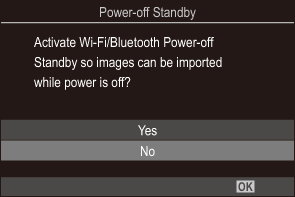
| Yes | Turn the camera off but leave the wireless smartphone connection active. |
|---|---|
| No | Turn the camera off and terminate the wireless smartphone connection. |
- If no operations are performed about a minute after the confirmation dialog is displayed, the camera will end the wireless connection to the smartphone and turn off automatically.
-
If left active, the wireless connection will automatically terminate if: The connection can be restored by turning the camera on.
- the connection remains inactive for 12 hours
- the memory card is removed
- the battery is replaced
- a charging error occurs during on-board battery charging
- Note that if [On] is selected for [Power-off Standby], camera may not turn on immediately when the power lever is rotated to K/n/0.