
Tracking Focus on Faces or Eyes of Subjects (nFace & Eye Detection)

During movie recording, the camera automatically detects and focuses on people's faces and eyes.
Super control panel
- OK U nFace & Eye Detection
Menu
- MENU U AF U 2. AF U nFace & Eye Detection
| On | Detect the subject's face or eye and focus on it. |
|---|---|
| Off | Face Priority AF is not used. |
- When [On] is selected, the AF mode changes from [C-AF+TR] to [C-AF].
- This function is disabled when the Sensor Frame Rate in 0 mode is set to [120fps].
Taking Pictures Using [nFace & Eye Detection]
Point the camera at your subject.
- When the camera detects faces, a white frame appears on the face in focus, and gray frames appear on other faces. Additional double frames are displayed on the four corners of the white frame on the face in focus.
- You can choose whether to display an eye detection frame when the camera detects a face (“Configuring the frame displays for detected eyes (Eye Detection Frame)”).
- When set to H, the face to focus on can be selected by tapping the screen (“Shooting with touch screen operations”).
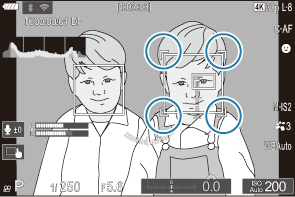
Press the AF-ON button to focus on the subject.
- A green frame appears on the focused area of the detected face.
- You can also select the face or the eyes with [MF]. When a face or eye is detected, a frame will be displayed. In this case, the exposure will still be set centered on the face.
- Press the R button to begin recording.
- The camera may fail to detect faces depending on the shooting conditions, the subject, or the art filter settings.
- When the zoom frame is displayed, the camera focuses on its position.