
Copying Pictures to the Computer (Storage/MTP)
You can transfer images by connecting the camera to your computer as a card reader or portable device.
-
After confirming that the camera is off, connect it to the computer using the USB cable.
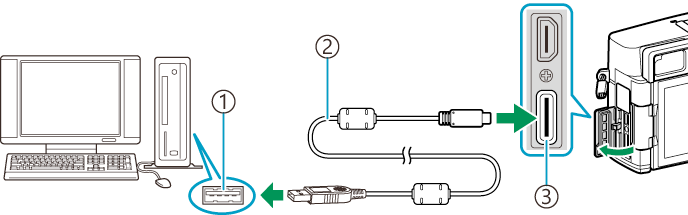
- USB port
- USB cable CB-USB11/CB-USB13 (sold separately)
- USB connector
- The locations of USB ports vary from computer to computer. See the documentation provided with the computer for information on USB ports.
-
Turn the camera on.
- The camera will display a message prompting you to identify the device to which the USB cable is connected.
- If the message is not displayed, select [Select] for [USB Mode].
- If the batteries are very low, the camera will not display a message when connecting to a computer. Be sure the batteries are charged.
Highlight [Storage] or [MTP] using FG and press the OK button.
[Storage]: The camera functions as a card reader.
[MTP]: The camera functions as a portable device.
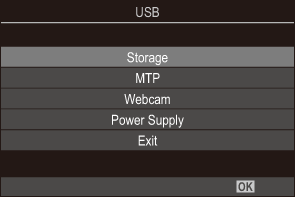
- The camera will connect to the computer as a new storage device.
-
Data transfer is not guaranteed in the following environments, even if your computer is equipped with a USB port.
- Computers with a USB port added by means of an extension card, etc., computers without a factory-installed OS, or home-built computers
- Camera functions cannot be used while the camera is connected to the computer.
- If the computer fails to detect the camera, disconnect and reconnect the USB cable.
- When [MTP] is selected, movies exceeding 4 GB cannot be copied to the computer.
- The camera battery may also be charged while connected to a computer via USB when the power lever is in the OFF position. Charging time varies significantly depending on the performance of the computer and other devices.