
Functions and Direct Buttons
Frequently-used photographic functions are assigned to buttons. These are referred to as “direct buttons”. They are useful when changing the settings frequently according to the subject.
The buttons to which functions can be assigned are listed below.
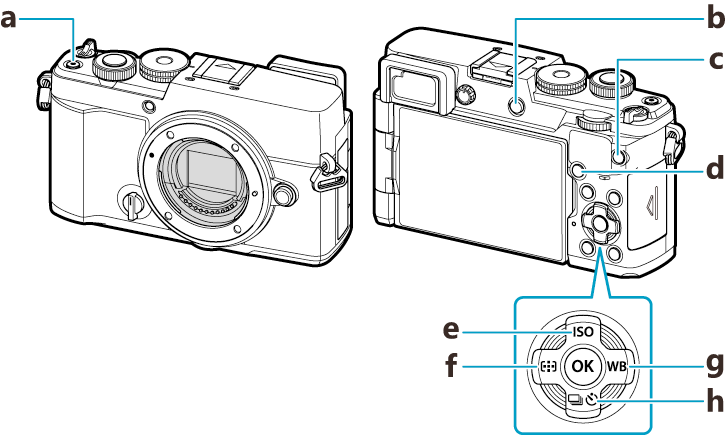
Direct buttons during photo shooting
| Direct button | Assigned function | |
|---|---|---|
| a | R button | Movie recording (“Recording Movies”) |
| b | U (LV) button | Display (monitor/viewfinder) selection (“Switching between displays”) |
| c | CP button | Computational Modes (“Using the CP button (Computational Modes)”) |
| d | AF-ON button | AF-ON (“Autofocus using the AF-ON button”, “Using Autofocus in Manual Focus Mode (z in MF mode)”) |
| e | ISO button (F) | ISO sensitivity (“Changing ISO sensitivity (KISO / nISO)”) |
| f | Y button (H) | Y AF Area Select (AF area select) (“Choosing a Focus Target (AF Target Point)”) |
| g | WB button (I) | White balance (“Adjusting color (WB (white balance))”) |
| h | gY button (G) | Sequential/self-timer shooting (“Performing the sequential/self-timer shooting”) |
- Each button can be assigned other roles. g “Changing the roles of buttons (Button Settings)”
Direct buttons during movie/0 recording
| Direct button | Assigned function | |
|---|---|---|
| a | R button | Movie recording (“Recording Movies”) |
| b | U (LV) button | [EVF Auto Switch] by pressing and holding the button |
| c | CP button | Exposure compensation (“Controlling exposure (Exposure Compensation)”) |
| d | AF-ON button | AF-ON (“Autofocus using the AF-ON button”, “Using Autofocus in Manual Focus Mode (z in MF mode)”) |
| e | ISO button (F) | ISO sensitivity (“Changing ISO sensitivity (KISO / nISO)”) |
| f | Y button (H) | Y AF Area Select (AF area select) (“Choosing a Focus Target (AF Target Point)”) |
| g | WB button (I) | White balance (“Adjusting color (WB (white balance))”) |
| h | gY button (G) | Off |
- Each button can be assigned other roles. g “Changing the roles of buttons (Button Settings)”
For information on how each direct button function works, see the explanation page of each function.