
Rotate the lever (K/n/0) to switch modes
Use the power lever (K/n/0) to switch modes.
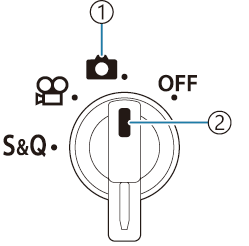
- Mode icon
- Indicator
| K | Shoot still pictures (“Shooting still pictures”). |
|---|---|
| n | Record movies at normal playback speed (“Recording movies in n/0 modes”). |
| 0 | Slow motion/fast motion movies can be recorded for sensor frame rate different from the playback frame rates (“Recording movies in n/0 modes”). |
- Sound is not recorded for a movie recorded in 0 mode.