
Tracking Focus on Selected Subjects (KSubject Detection)

When focusing, the camera can detect people’s faces and eyes, as well as fast-moving subjects.
Menu
- MENU U AF U 2. AF U KSubject Detection
| K (Human) | The camera detects people. It tracks focus on such elements as the face, head, eyes, and upper body. |
|---|---|
| 8 (Dogs & Cats) | The camera detects cats, dogs, and similar animals. It tracks focus on such elements as the head or eyes. |
| Off | Tracking subject selection disabled. |
- When a setting other than [Off] is selected, [RAF] ([RAFJ]) is set to [S-AF] ([S-AFJ]), and [C-AF+TR] ([C-AF+TRJ]) is set to [C-AF] ([C-AFJ]).
Taking Pictures Using [KSubject Detection]
Point the camera at your subject.
- When the camera detects subjects, a white frame appears on the subject which is focused on. Gray frames appear on other subjects. On the subject which is focused on, an additional frame appears surrounding the white frame.
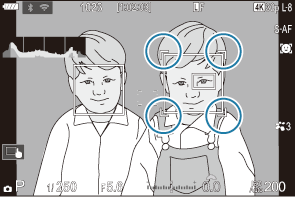
-
When the camera detects specific elements such as eyes, smaller white frames also appears on them.
These frames can be hidden from the menu (“Configuring the frame displays for detected eyes (Eye Detection Frame)”).
- If multiple subjects are detected, the white frame indicating the subject to focus on may switch to another subject.
- If the white frame indicating a subject to be focused on appears on another subject, change the size and/or position of the AF target so that it overlaps the subject to be focused on.
- When set to I, if multiple subjects are detected, you can select the subject to focus on by tapping the screen (“Shooting with touch screen operations”).
- When set to I, if eyes are detected while [K] (Human) is selected, you can select which eye to focus on by tapping the screen (“Shooting with touch screen operations”).
-
Press the shutter button halfway to focus.
- You can also focus by pressing the AF-ON button (“Autofocus using the AF-ON button”).
- When the camera focuses on a subject, a green frame appears on the focus position.
- When the camera detects eyes, it focuses on them.
- When [C-AF] or [C-AFJ] is selected for AF mode, the camera will continue to track and focus on the subject with the white frame, even while the subject is in motion, until the button is released.
- Press the shutter button the rest of the way down to take the picture.
- The camera may fail to detect the subject depending on the subject or art filter selected.
- The camera may fail to detect the subject depending on its type or on shooting conditions.