
Letting the camera choose the settings (9 Mode)
The camera adjusts settings to suit the scene. Use live guides to easily adjust such parameters as color, brightness, and background blurring.
- Rotate the power lever to K, n, or 0.
Rotate the mode dial to 9.
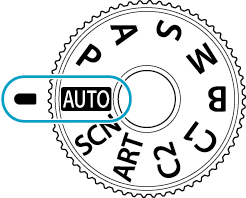
- The camera automatically selects the scene mode option appropriate to your subject. Once the selection has been made, the 0 icon in the bottom left corner of the display will be replaced by the icon for the chosen scene. In K mode, press the shutter button halfway to select the scene mode option.
To adjust shooting settings, display the live guide by pressing the OK button.
- When the power lever is rotated to n or 0, [Express Motions] and [Shooting Tips] are not displayed.
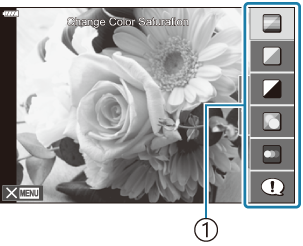
- Guide item
- Use FG to highlight an item in the live guide and press OK to display a slider.
Use FG to position the slider and choose a level.
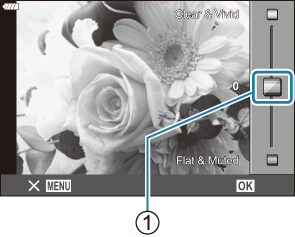
- Slider
- Press the OK button to save changes.
- To exit, press the MENU button.
- When [Shooting Tips] is selected, use FG to highlight the item and press the OK button to display the detail.
-
The effect of the selected level is visible in the display.
If [Blur Background] or [Express Motions] is selected, the display will return to normal, but the selected effect will be visible in the final photograph.
To set multiple live guides, repeat Steps 2 and 3.
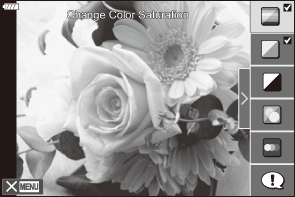
- A check is displayed on the guide item for live guides that are already set.
- To clear the live guides from the display, press the MENU button.
- [Blur Background] and [Express Motions] cannot be set at the same time.
-
Release the shutter.
- Press the shutter button in K mode.
- Press the R button in n/0 modes.
- Live guide settings can also be adjusted using touch controls.
- Selecting [RAW] for image quality automatically sets it to RAW+JPEG when a live guide is set.
- Live guide settings are not applied to the RAW copy.
- Pictures may appear grainy at some live guide setting levels.
- Changes to live guide setting levels may not be visible in the monitor.
- The flash cannot be used when a live guide is set.
- Choosing live guide settings that exceed the limits of the camera exposure meters may result in pictures that are overexposed or underexposed.
- Frame rates drop the closer the [Express Motions] slider is to [Blurred Motion].
- The setting for [Express Motions] does not apply to videos.
- Rotating the power lever to n or 0 will exit live guide if only [Express Motions] is set.