
Names of parts
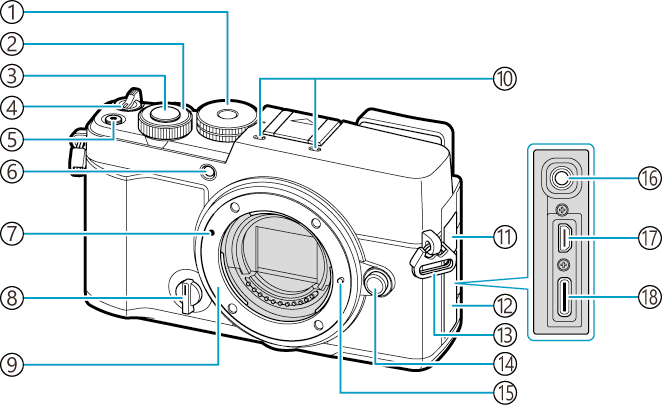
- Mode dial (“Types of shooting modes”)
- Front dial (“Letting the camera choose aperture and shutter speed (P: Program AE)”, “Choosing aperture (A: Aperture-Priority AE)”, “Choosing shutter speed (S: Shutter-Priority AE)”, “Choosing aperture and shutter speed (M: Manual Exposure)”, “How to operate the menus”, “Viewing photographs”, “Changing the roles of the front and rear dials during playback (qDial Function)”, “Assigning Roles to the Front and Rear Dials (KDial Function / nDial Function)”, “Changing the Dial Direction (Dial Direction)”)
- Shutter button (“Shooting still pictures”)
- Power lever (K/n/0) (“Turning the camera on”, “Rotate the lever (K/n/0) to switch modes”)
-
R (Movie) button (“Recording Movies”)
4 (Selection) button (“Selecting Multiple Pictures (Share Order Selected, Rating Selected, 0, Erase Selected)”)
-
Self-timer lamp (“Performing the sequential/self-timer shooting”)
AF illuminator (“AF Illuminator Autofocus Assist (AF Illuminator)”)
Movie recording lamp (“Lamp during movie recording (Recording Lamp)”)
- Lens attachment mark (“Attaching a lens to the camera”)
- Profile control switch (“Changing the modes using the Profile Control Switch”)
- Mount (Remove the body cap before attaching the lens.)
- Stereo microphone (“Sound Recording Options (Sound Recording Settings)”, “Adding Audio to Pictures (c)”)
- Microphone jack cover
- Connector cover
- Strap eyelet (“Attaching the Strap”)
- Lens release button (“Removing Lenses”)
- Lens lock pin
- Microphone jack (A commercially available microphone can be connected. ø3.5 stereo mini plug) (“Sound Recording Options (Sound Recording Settings)”)
- HDMI connector (Type D) (“HDMI Output (nHDMI Output)”, “Viewing Pictures on a TV (HDMI)”)
- USB connector (Type C) (“Charging the battery using an optional USB-AC adapter (F-5AC)”, “Charging the battery using a USB device”, “Copying Pictures to the Computer (Storage/MTP)”, “Using the Camera as a Webcam (Webcam)”, “Powering the Camera via USB (Power Supply)”)
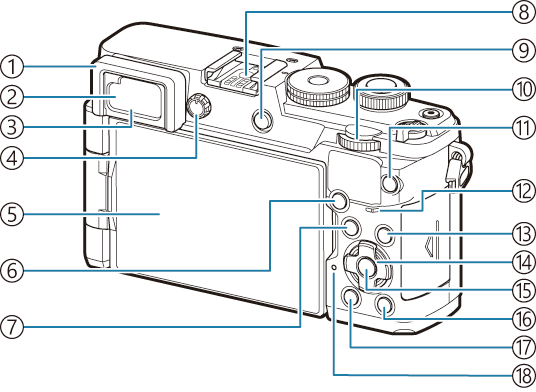
- Eyecup
- Eye sensor (“Switching between displays”)
- Viewfinder (“Switching between displays”, “Selecting the display style of the viewfinder (EVF Style)”)
- Diopter adjustment dial (“Switching between displays”)
- Monitor (Touch screen) (“Information displays while shooting”, “Switching between displays”, “Shooting with touch screen operations”, “Touch AF Target Selection for Viewfinder Photography (AF Targeting Pad)”, “Playback Using Touch Controls”)
-
AF-ON button (“Autofocus using the AF-ON button”, “Using Autofocus in Manual Focus Mode (z in MF mode)”)
0 (Protect) button (“Protecting Pictures (0)”)
- MENU button (“How to operate the menus”)
- Hot shoe (“Attaching Compatible Flash Units”, “Other external flash units”)
- U (LV) button (“Switching between displays”)
- Rear dial (“Letting the camera choose aperture and shutter speed (P: Program AE)”, “Choosing aperture (A: Aperture-Priority AE)”, “Choosing shutter speed (S: Shutter-Priority AE)”, “Choosing aperture and shutter speed (M: Manual Exposure)”, “How to operate the menus”, “Viewing photographs”, “Changing the roles of the front and rear dials during playback (qDial Function)”, “Assigning Roles to the Front and Rear Dials (KDial Function / nDial Function)”, “Changing the Dial Direction (Dial Direction)”)
-
CP button (“Using the CP button (Computational Modes)”)
E (Rating) button (“Rating Pictures (Rating)”)
- Speaker
- INFO button (“Switching the information display”, “Displaying the description of a menu item”, “Switching the information display”)
- Arrow pad (“Functions and Direct Buttons”, “Viewing photographs”)
- OK button (“How to operate the menus”, “On LV Super Control Panel/Super Control Panel”, “Viewing photographs”)
- q (Playback) button (“Viewing photographs”)
- D (Erase) button (“Deleting Pictures (Erase)”)
- Battery charge lamp (“Charging the battery using an optional USB-AC adapter (F-5AC)”)
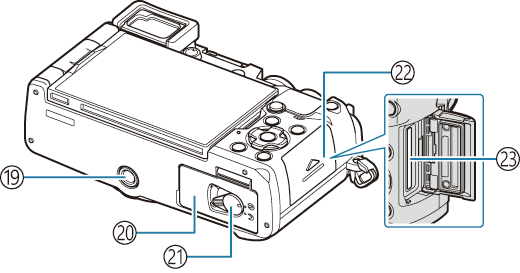
- Tripod socket
- Battery compartment cover (“Inserting and removing the battery”)
- Battery compartment lock (“Inserting and removing the battery”)
- Card compartment cover (“Inserting and removing the card”)
- Card slot (“Inserting the card”)