
Controlling exposure (Exposure Compensation)

The exposure selected automatically by the camera can be altered to suit your artistic intent. Choose positive values to make pictures brighter, negative values to make them darker.
Button
- When a shooting mode other than M is selected in K mode: Button to which [F] (exposure compensation) is assigned U HIli
- When M is selected for the shooting mode in K mode: Rotate the front or rear dial while pressing the button to which [F] (exposure compensation) is assigned.
- When a shooting mode other than M is selected in n/0 modes: CP button U HIli
- When M is selected for the shooting mode in n/0 modes: Rotate the front or rear dial while pressing the CP button.
Super control panel
- OK U Exposure Comp.
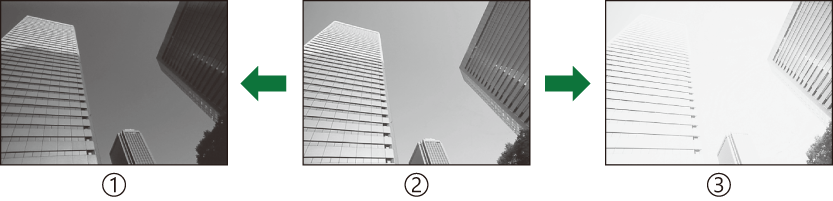
- Negative (–)
- No compensation (0)
- Positive (+)
- During photo shooting, exposure compensation can be adjusted by up to ±5.0 EV. The viewfinder and live view show the effects of values not exceeding ±3.0 EV. The exposure bar flashes when the value exceeds ±3.0 EV.
- During movie recording, exposure compensation can be adjusted by ±3.0 EV.
- The front and rear dials or touch controls can be used to adjust exposure during movie recording.
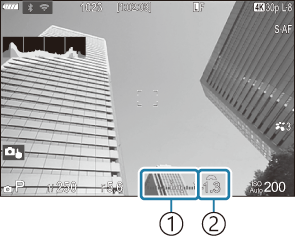
- Exposure bar
- Exposure compensation value
- To preview the effects of exposure compensation in live view, select [Off] for [KNight Vision].
Adjusting Exposure Compensation
Modes P, A, S, and ART
- Rotate the front dial to adjust exposure compensation.
- Release the shutter.
Mode M
In K mode, select [P/A/S/M] for [KISO-Auto] and [Auto] for [KISO].
In n/0 modes, select [On] for [bISO-Auto] and [Auto] for [nISO].
- Press the button to which [F] (exposure compensation) is assigned and then rotate the front dial or rear dial to adjust exposure compensation.
- Release the shutter.
Resetting Exposure Compensation
To reset exposure compensation, press and hold the OK button.