
Inserting and removing the battery
Inserting the battery
Confirm that the power lever is in the OFF position.
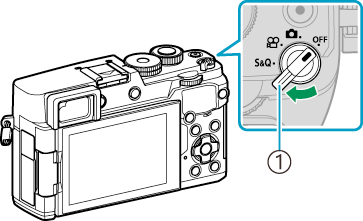
- Power lever
Open the battery compartment cover.
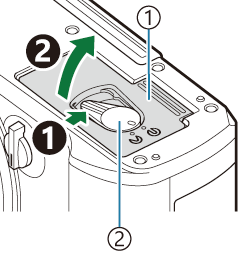
- Battery compartment cover
- Battery compartment lock
Insert the battery.
- Use only BLS-7 batteries (“Unpacking the box contents”, “Lithium-ion battery”).
- Insert the battery as illustrated with the a mark toward the battery lock knob.
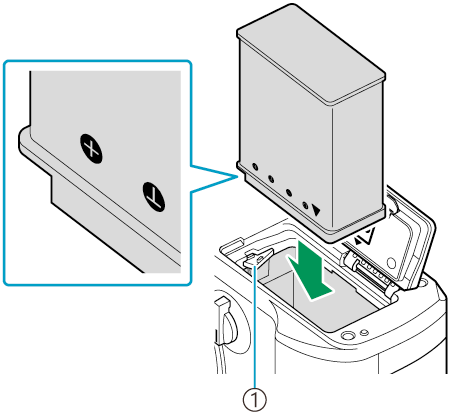
- Battery lock knob
-
Close the battery compartment cover.
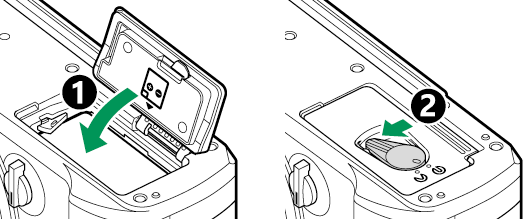
- Be sure the battery compartment cover is closed before using the camera.
- It is recommended to set aside a backup battery for prolonged shooting in case the battery in use drains.
- See also “Batteries”.
Removing the battery
Turn off the camera before opening or closing the battery compartment cover. To remove the battery, first push the battery lock knob in the direction of the arrow and then remove.
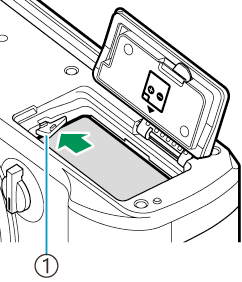
- Battery lock knob
- Contact an authorized distributor or service center if you are unable to remove the battery. Do not use force.
- Never remove batteries or memory cards while the card write indicator (“Information displays while shooting”) is displayed.
- Remove the battery before putting the camera into storage for periods of a month or more.