
Setting the Quality of Photos and Movies (KX / nX / 0X)

You can set the image quality modes for photos and movies. Select a quality suitable for the application (such as for processing on PC, use on website etc.).
In [0X], you can set slow motion movie and quick motion movie.
Super control panel
- OK U KX / nX / 0X
Menu
- MENU U a U 1. Basic Settings/Image Quality U KX
- MENU U n U 1. Basic Settings/Image Quality U nX
- MENU U n U 1. Basic Settings/Image Quality U 0X
Configuring KX
| Item | Image size | Compression ratio | File format |
|---|---|---|---|
| LSF | 5184 × 3888 | SuperFine (1/2.7) | JPG |
| LF | 5184 × 3888 | Fine (1/4) | JPG |
| LN | 5184 × 3888 | Normal (1/8) | JPG |
| aN | 3200 × 2400 | Normal (1/8) | JPG |
| RAW | 5184 × 3888 | Loss-less compression | ORF |
| RAW+JPEG | RAW plus the JPEG option selected above | ||
- The image size/compression combinations available can be selected in the menus. g “Combinations of JPEG image sizes and compression rates (KX Detailed Settings)”
- The options available during high resolution shooting (“Shooting still pictures in a higher resolution (High Res Shot)”) are IF, JF, IF+RAW, and JF+RAW.
- Selecting High Res Shot (“Shooting still pictures in a higher resolution (High Res Shot)”) changes the image quality option selected; be sure to check the image quality setting before shooting.
-
RAW files store raw image data in an unprocessed state. Choose this format (extension “.ORF”) for pictures that will later be enhanced.
- Cannot be viewed on other cameras
- Can be viewed on computers using OM Workspace Digital Photo Managing software
- Can be saved in JPEG format using the [RAW Data Edit] retouch option in the camera menus
Configuring nX
- To change the settings of each image quality mode, press I while an image quality mode is selected.
The Movie Quality Icon
Changes to settings are reflected in the n movie quality icon as shown. Changes to settings are reflected in the movie quality icon as shown. Up to three combinations can be saved.
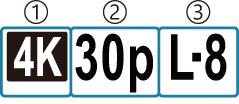
- Movie Resolution
- Playback Frame Rate
- Motion Compensation
Movie Resolution
| 4 | 4K | 3840 × 2160 |
|---|---|---|
| 3 | FHD (Full HD) | 1920 × 1080 |
| 5 | C4K (4K Digital Cinema) | 4096 × 2160 |
Motion Compensation
| I-8 | A-I (ALL-Intra 1) |
|---|---|
| L-8 | L-GOP (LongGOP) |
When ALL-Intra is used, the movie will be recorded without interframe compression. It is suitable for editing, but the data will be large.
- Fixed to [L-GOP] when [Movie Resolution] is [4K] or [C4K].
Playback Frame Rate
| 60p 1 | 59.94p |
|---|---|
| 50p 1 | 50.00p |
| 30p | 29.97p |
| 25p | 25.00p |
|---|---|
| 24.00p 2 | 24.00p |
| 24p | 23.98p |
Not available when:
- [FHD] (Full HD) is selected for [Movie Resolution] and [A-I] is selected for [Motion Compensation]
- [C4K] or [4K] is selected for [Movie Resolution]
This option can only be selected when [Movie Resolution] is [C4K].
Configuring 0X
- To change the settings of each movie quality mode, press I while the mode is selected.
The Movie Quality Icon
Changes to settings are reflected in the 0 movie quality icon as shown. Changes to settings are reflected in the movie quality icon as shown. Up to three combinations can be saved.
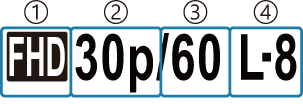
- Movie Resolution
- Playback Frame Rate
- Sensor Frame Rate
- Motion Compensation (unchangeable)
Movie Resolution
| 4 | 4K | 3840 × 2160 |
|---|---|---|
| 3 | FHD (Full HD) | 1920 × 1080 |
| 5 | C4K (4K Digital Cinema) | 4096 × 2160 |
Playback Frame Rate
| 60p 1 | 59.94p |
|---|---|
| 50p 1 | 50.00p |
| 30p | 29.97p |
| 25p | 25.00p |
|---|---|
| 24.00p 2 | 24.00p |
| 24p | 23.98p |
Not available when:
- [C4K] or [4K] is selected for [Movie Resolution]
- the mode dial is set to SCN
This option can only be selected when [Movie Resolution] is [C4K].
Sensor Frame Rate
| 120 1 | 119.88 fps |
|---|---|
| 60 1 | 59.94 fps |
| 50 1 | 50.00 fps |
| 30 1 | 29.97 fps |
| 25 | 25.00 fps |
| 24 | 23.98 fps |
| 15 | 14.99 fps |
| 12 | 11.99 fps |
|---|---|
| 8 | 7.99 fps |
| 6 | 5.99 fps |
| 3 | 2.997 fps |
| 2 | 1.998 fps |
| 1 | 0.999 fps |
This option can only be selected when [Movie Resolution] is [FHD].
- The available sensor frame rates vary with the playback frame rate setting.
Motion Compensation
| L-8 | L-GOP (LongGOP) |
|---|
- Fixed to [L-GOP] with S&Q (slow and quick) movies.
On the [0X] settings screen, you can check whether a slow motion movie or quick motion movie will be recorded. If the value (speed) is less than 1, it will record in slow motion, and if it is greater than 1, it will record in quick motion.
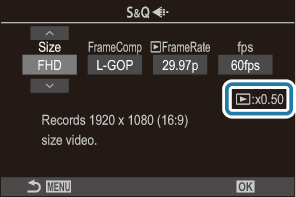
- When the sensor frame rate is set to 120 fps, movies are filmed at 120 fps and played back at 23.98 - 59.94 fps. Stretching playback to 2x - 5x the recording time lets you view in slow motion movements that in real life took only the blink of an eye.
- Sound is not recorded.
- When the camera is connected to a smartphone via Wi-Fi for remote shooting, the movie will be recorded in n mode even if the power lever is rotated to 0.
- Only shutter speeds of 1/24 s or faster are available. Availability depends on the Sensor Frame Rate setting.
- When [nAF Mode] is set to [MF] or [PreJ] in M mode, a shutter speed slower than 1/24 s can be set by lowering the frame rate, but the response of camera buttons may become slower.
- Depending on the card used, recording may end before the maximum length is reached.
- Movies are recorded at an aspect ratio of 16:9. C4K movies are recorded at an aspect ratio of 17:9.
- [e-Portrait] and art filter picture modes (“Processing options (KPicture Mode / nPicture Mode)”) are not available.
Restrictions when the sensor frame rate is 120 fps
- When an SD/SDHC card is used, the size of one file is limited to 4 GB. When an SDXC card is used, recording stops before the playback time reaches two hours.
- Focus, metering, and white balance lock during recording.
- The picture angle is slightly reduced.
- Aperture, shutter speed, exposure compensation, and ISO sensitivity cannot be changed during recording.
- Time codes cannot be recorded or displayed.
- Brightness may change if zoom is adjusted during recording.
- The sensor frame rate cannot be set to 120 fps when the camera is connected to a device via HDMI.
- The sensor frame rate cannot be set to 120 fps when the mode dial is set to SCN.
- bAll (all targets) cannot be selected for AF target mode.
- [nImage Stabilizer] > [M-IS1] is not available.
- Picture Mode (“Processing options (KPicture Mode / nPicture Mode)”) > [i-Enhance] is not available.
- [OM-Cinema1] and [OM-Cinema2] in nPicture Mode (“Setting detailed options of a Picture Mode Exclusive for Movies”) are not available.
- [Gradation] is fixed at [Gradation Normal].
- [nFace & Eye Detection] is disabled during recording.
- [C-AF] and [C-AF+TR] in [nAF Mode] are not available.
- [nDigital Tele-converter] will be set to [Off].