
Shooting in scene mode (SCN Mode)
The camera automatically optimizes settings for the subject or scene.
- Rotate the power lever to K, n, or 0.
Rotate the mode dial to SCN.

Use FGHI to highlight a scene and press the OK button.
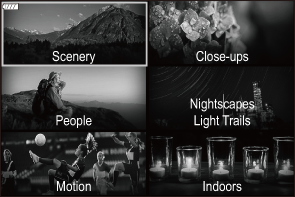
Use HI to highlight a scene mode and press the OK button.
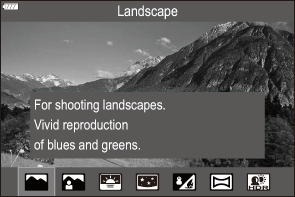
Release the shutter.
- To choose a different scene, press the OK button. Next, press the MENU button to return to the scene-selection display.
- Scenes can also be selected using touch controls.
Types of scene modes
K only: This option can only be selected when the power lever is rotated to K.
Scenery
| F | Landscape | Suitable for landscape shooting. |
|---|---|---|
| D | Portrait + Landscape | Suitable for portraits featuring a landscape in the background. Blues, greens, and skin tones are captured beautifully. |
| Y | Sunset | Suitable for shooting the sunset. |
| y | Starry Scene (K only) |
Suitable for shooting landscapes featuring starry skies. The colors of the starry sky are captured beautifully. Use a tripod or take similar measures to fix the camera in place.
|
| L | Beach & Snow | Suitable for shooting at snow-capped mountains, seascapes in the sun, and other whitish scenes. |
| X | Panorama (K only) |
Take photos that can afterwards be joined on a computer to create a panorama.
|
| A | Backlight HDR (K only) |
Suitable for high-contrast scenes. Each time the shutter button is pressed, the camera takes four shots that are automatically combined to form a single, correctly exposed image when shooting is complete. |
Close-ups
| Q | Nature Macro | Suitable for vivid close-ups of flowers or insects. |
|---|---|---|
| P | Macro | Suitable for close-ups. |
| U | Multi Focus Shot (K only) |
The camera takes eight photos, varying the focus distance with each shot. |
| M | Documents (K only) |
Suitable for photos of timetables or other documents. The camera heightens the contrast between the text and background. |
People
| D | Portrait + Landscape | Suitable for portraits featuring a landscape in the background. Blues, greens, and skin tones are captured beautifully. |
|---|---|---|
| B | Portrait | Suitable for portrait shooting. Brings out skin texture. |
| E | e-Portrait (K only) |
Smooths out skin tones and texture. The camera records two pictures: one with the effect applied and one without. |
| J | Portrait + Nightscape (K only) |
Suitable for portrait shooting against a background of night view. Attach an external flash unit designed for use with the camera (“Attaching Compatible Flash Units”). We recommend that you use a tripod and either OM Image Share or an optional remote control (“Shooting remotely with a smartphone (Live View)”, “Shooting from the remote control”). |
| S | Children | Suitable for photographs of children and other active subjects. |
Nightscapes
Light Trails
| T | Light Trails (K only) |
The camera automatically shoots multiple images, takes newly bright areas only, and composites them into a single image. With normal long exposure, an image of light trace such as star trails with bright buildings tends to get too bright. You can capture them without over exposure while checking the progress. Press the shutter button to start shooting, then view the changing result in the monitor and press the shutter button again to end shooting once the desired result is achieved (maximum 3 hours). We recommend that you use a tripod and either OM Image Share or an optional remote control (“Shooting remotely with a smartphone (Live View)”, “Shooting from the remote control”).
|
|---|---|---|
| y | Starry Scene (K only) |
Suitable for shooting landscapes featuring starry skies. The colors of the starry sky are captured beautifully. Use a tripod or take similar measures to fix the camera in place.
|
| G | Nightscape | Suitable for tripod shooting of night scenes. We recommend that you use a tripod and either OM Image Share or an optional remote control (“Shooting remotely with a smartphone (Live View)”, “Shooting from the remote control”). |
| J | Portrait + Nightscape (K only) |
Suitable for portrait shooting against a background of night view. Attach an external flash unit designed for use with the camera (“Attaching Compatible Flash Units”). We recommend that you use a tripod and either OM Image Share or an optional remote control (“Shooting remotely with a smartphone (Live View)”, “Shooting from the remote control”). |
| O | Handheld Starlight (K only) |
Suitable for shooting night scenes without a tripod. Reduces blur when shooting low light/illuminated scenes. The camera makes eight exposures and combines them into a single photograph. |
| K | Fireworks | Suitable for shooting fireworks at night. We recommend that you use a tripod and either OM Image Share or an optional remote control (“Shooting remotely with a smartphone (Live View)”, “Shooting from the remote control”). |
Motion
| C | Sport | Suitable for fast action shooting. |
|---|---|---|
| S | Children | Suitable for photographs of children and other active subjects. |
| z | Dogs & Cats (K only) |
Suitable for photographs of dogs and cats. Disable camera sounds and lights. |
| W | Panning (K only) |
Choose to blur the background behind moving objects. The camera chooses the optimal shutter speed for panning shots based on camera motion. |
Indoors
| N | Candlelight | Suitable for shots of candlelit scenes. Warm colors are preserved. |
|---|---|---|
| R | SilentI | Disable camera sounds and lights in situations in which they may be unwelcome. |
| B | Portrait | Suitable for portrait shooting. Brings out skin texture. |
| E | e-Portrait (K only) |
Smooths out skin tones and texture. The camera records two pictures: one with the effect applied and one without. |
| S | Children | Suitable for photographs of children and other active subjects. |
| z | Dogs & Cats (K only) |
Suitable for photographs of dogs and cats. Disable camera sounds and lights. |
| A | Backlight HDR (K only) |
Suitable for high-contrast scenes. Each time the shutter button is pressed, the camera takes four shots that are automatically combined to form a single, correctly exposed image when shooting is complete. |
- In [Panning], W is displayed during panning detection, and V is displayed when nothing is detected.
- To maximize the benefits of the scene modes, some of the shooting function settings are disabled.
- Some time may be needed to record pictures taken using [e-Portrait]. In addition, when the image quality mode is [RAW], the image is recorded in RAW+JPEG.
- [Handheld Starlight] pictures taken with [RAW] selected for image quality will be recorded in RAW+JPEG format, with the first frame recorded as a RAW image and the final composite as a JPEG image.
- [Backlight HDR] records HDR-processed images in JPEG format. When the image quality mode is set to [RAW], the image is recorded in RAW+JPEG.
When using a lens with an image stabilizer switch in [Panning], turn the image stabilizer switch off.
Sufficient panning effects may not be obtained in bright conditions. Use a commercially available ND filter to obtain effects more easily.
- Shooting will end if zoom is adjusted while photographs are being taken in [Multi Focus Shot] mode.
- No pictures can be taken in [Multi Focus Shot] mode when a Four Thirds lens is attached.
Shooting a Starry Scene or a Starry Sky
Highlight [Starry Scene] in the scene mode menu (“Shooting in scene mode (SCN Mode)”) and press the OK button.
- [v Stabilize the camera] is displayed if the camera is not steady. Use a tripod or take similar measures to fix the camera in place.
- Position the AF frame over a bright star.
Press the AF-ON button to initiate starry sky AF.
- To interrupt starry sky AF, press the AF-ON button again.
- The camera displays [Starry Sky AF is Running] during starry sky AF. The in-focus indicator (N) is displayed for about two seconds after the camera focuses; if the camera is unable to focus, the in-focus indicator will instead flash for about two seconds.
Press the shutter button the rest of the way down to take the picture.
- The shutter is released two seconds after the shutter button is pressed all the way down.
- Tap a brighter star to focus and automatically release the shutter.
- The camera will not be able to focus in bright locations.
- Manual focus is selected when a Four Thirds lens is attached.
- Starry sky AF is available with Micro Four Thirds lenses made by OM Digital Solutions or OLYMPUS. It cannot, however, be used with lenses with a maximum aperture over F5.6. For more information, visit our website.
- By tapping the screen, if the camera is unable to focus, no photo will be taken.
- Your choice of AF target modes is restricted to rSingle, oMiddle, or lLarge (“Choosing an AF Target Mode (AF Target Mode)”).
- The camera automatically focuses at infinity when [Starry Scene] is selected in scene mode.
- You can configure the camera so that starry sky AF starts when the shutter button is pressed halfway. g “Changing the settings of Starry Sky AF (Starry Sky AF Setting)”
- To eliminate the delay between pressing the shutter button all the way down and shutter release, set [Drive g/Y] to [F] (single). g “Performing the sequential/self-timer shooting”
Shooting a Panorama
Pictures taken using this option can be joined together to form a panorama. You will need to install the latest version of OM Workspace on your computer to join pictures together to form a panorama. g “Installing Software”
- Highlight [Panorama] in the scene mode menu (“Shooting in scene mode (SCN Mode)”) and press the OK button.
- Use FGHI to choose a pan direction.
Take a picture, using the guides to frame the shot.
- Focus, exposure, and other settings are fixed at the values for the first shot.
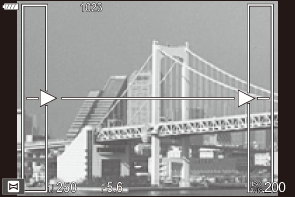
Take the remaining images, framing each shot so that the guides overlap with the previous picture.

- A panorama may include up to 10 images. A warning indicator (c) is displayed after the tenth shot.
- During panorama shooting, the image previously taken for position alignment will not be displayed. With the frames or other markers for display in the images as a guide, set the composition such that the edges of the overlapping images overlap within the frames.
- After taking the last shot, press OK to end the series.